Best Video Formats for Web, Social Media, and Email
Confused by video formats? Discover the top choices for websites, social media, and email, and learn how to shrink them effortlessly.
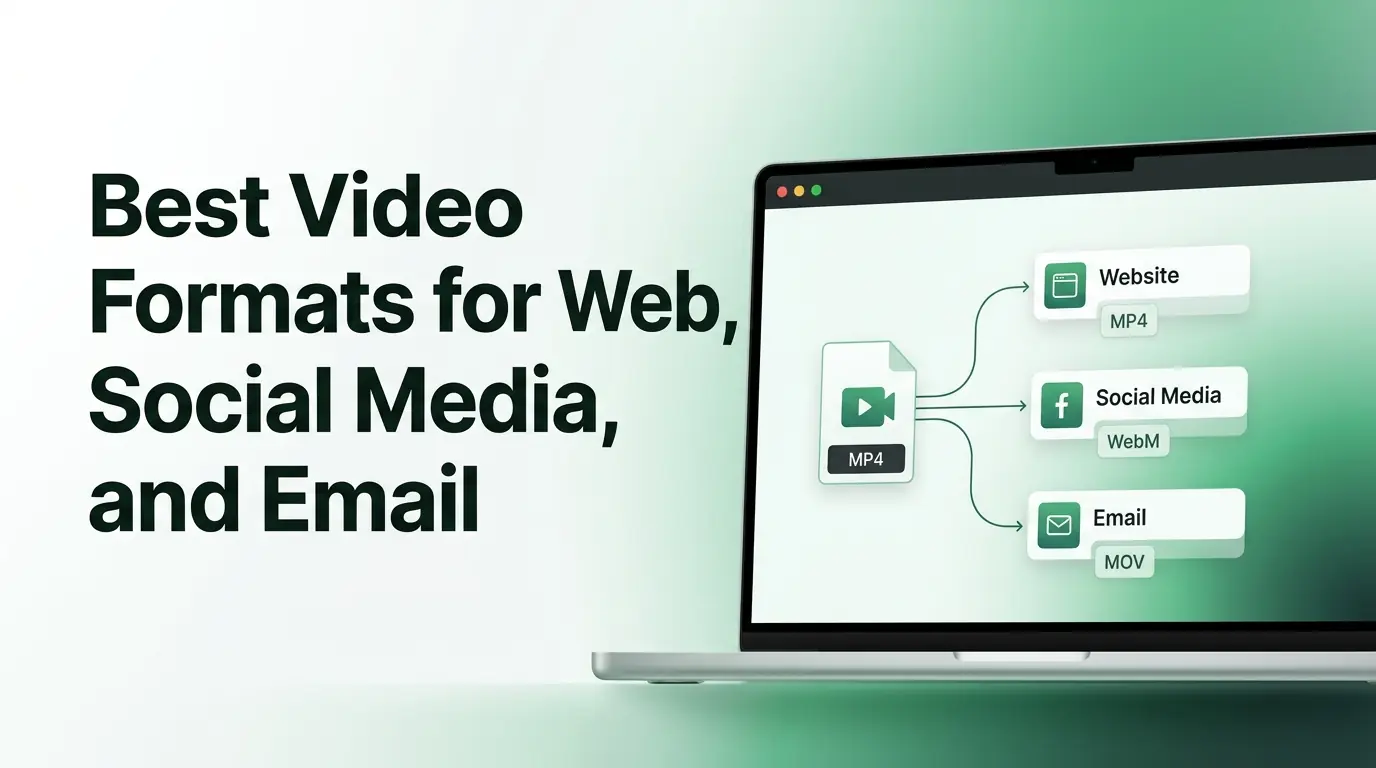
Introduction
Have you ever tried uploading a video to your website, only to watch the loading wheel spin endlessly? Or maybe you tried sending an important video update to your email subscribers, but a red error message popped up saying your file was too large. These moments are incredibly frustrating for bloggers, creators, and business owners alike. We live in a world where video is the most powerful way to connect with people online, but managing these files can feel like a total headache.
Choosing the correct video file format changes everything. The format you choose directly impacts how clear your video looks, how much space it takes up on your hard drive, and how fast it loads on a smartphone. If you use the wrong container, your viewers might experience constant buffering, or worse, their browsers might refuse to play the clip at all. This guide will demystify the process entirely. You will learn how to pick the perfect file setup for every platform, keep your files lightweight, and ensure your audience gets a smooth viewing experience every single time.
Understanding Video Formats and Codecs
What Is a Video Format?
Many people use the terms format and codec interchangeably, but they actually mean two different things. Think of a video format as a digital cardboard box. This box holds the video track, the audio track, subtitles, and important data about the recording. When you see a file ending in dot mp4 or dot mov, you are looking at the name of the container box.
What Is a Video Codec?
If the format is the box, the codec is the method used to pack the clothes inside that box. Codec stands for compressor-decompressor. It is a smart software tool that shrinks huge video data so it can travel across the internet easily.
- H.264: This is the most popular packer in the world, trusted by almost every website and device on earth for its reliability.
- H.265 (HEVC): The next generation after H.264, which cuts file sizes in half while keeping beautiful quality, though it requires more processing power.
- VP9: A clever open-source compression engine built by Google to make internet streaming smoother.
- AV1: The newest breakthrough technology that offers amazing space savings for high-definition web videos without demanding royal fees.
Why Formats Matter
The digital box you choose determines whether your video will actually play when a user clicks the start button. If you pick an unusual box, a customer's iPhone or a subscriber's Chrome browser might not understand how to open it. Formats also dictate whether you will slam into strict upload limits on social media, suffer poor streaming performance, or get blocked by tight email attachment restrictions.
What Makes a Good Video Format?
Compatibility
A truly great web format needs to be a universal crowd-pleaser. It should play flawlessly on an old Windows laptop, a brand-new iPad, an Android phone, and every major internet browser without requiring users to download special plug-ins.
File Size
Digital storage costs money, and large files take a long time to move. A good format packages your data tightly. Smaller file sizes mean your videos upload to servers faster and require less cloud storage space, saving you from expensive monthly bills.
Video Quality
You should never have to sacrifice the beauty of your footage just to make it fit online. The best formats use highly efficient compression technology to wipe away invisible data while keeping the textures, colors, and edges of your image looking crisp and alive.
Streaming Performance
When a viewer lands on your blog, they expect the media to play instantly. A great web format supports progressive downloading. This means the clip can start playing the first few seconds while the rest of the file continues to load quietly in the background, reducing annoying buffering breaks.
MP4: The Best All-Around Video Format
What Is MP4?
MPEG-4 Part 14, universally known as MP4, is the absolute gold standard of the internet age. Created in the early 2000s, it has grown to become the most recognized and supported video box on the planet.
Advantages of MP4
The biggest superpower of MP4 is its universal compatibility. It is the closest thing the digital world has to a universal language. It offers an incredible quality-to-size ratio, meaning your clips look stunning while maintaining a modest digital footprint. Every major social media app, website builder, and email platform accepts MP4 with open arms.
Best Use Cases
Because it works everywhere, MP4 is the safest default choice for daily tasks. Use it for your primary website videos, regular social media posts, small email clips, and premium online courses. If you are unsure which option to pick, choose MP4.
Potential Limitations
While it is fantastic, MP4 is no longer the absolute sharpest tool in the shed. Newer compression boxes can sometimes compress high-definition 4K footage slightly better, making MP4 files marginally larger than some cutting-edge alternatives.
WebM: The Best Format for Modern Websites
What Is WebM?
WebM is an innovative media file type introduced by Google. They built it specifically for the modern internet, wanting to create a completely open and royalty-free option that fits the needs of online streaming perfectly.
Advantages of WebM
WebM delivers remarkably small file sizes without turning your footage into a blurry mess. It loads incredibly fast because it strips out the heavy legacy code that older containers carry. It is tailor-made for seamless web delivery and integrates beautifully with modern HTML5 website players.
Best Use Cases
This is the ultimate choice for your business landing pages, background video loops, and blog post illustrations. If you want your website to achieve maximum speed scores on Google performance tests, WebM is your best friend.
Limitations
The primary downside is that WebM is a web-focused creature. It is not ideal for sharing outside of internet browsers. Some older operating systems and native desktop media players still struggle to open WebM files without help.
MOV: Best for Editing and Apple Devices
What Is MOV?
MOV is a file format developed by Apple for their QuickTime player. It is a premium container that focuses heavily on preserving immaculate visual detail above everything else.
Advantages
MOV files maintain exceptional quality. They do not compress your footage aggressively, which leaves every single pixel sharp and full of rich color. This makes them absolute favorites for professional editors who need to alter footage without losing clarity.
Drawbacks
The pursuit of perfect quality has a massive cost. MOV files are notoriously heavy data hogs. They will eat up your hard drive space quickly and are generally too heavy to load smoothly over normal mobile data networks.
Best Use Cases
Keep MOV files confined to your video production workflows. Use them when you are editing clips inside software like Final Cut Pro, collaborating with professional videographers, or saving master files on your backup drives.
Other Common Video Formats
MKV
Matroska, or MKV, is an incredibly powerful open container that can hold an unlimited number of video, audio, and subtitle tracks in a single file. It is the ultimate tool for archiving movies and managing advanced media libraries, but its complex nature makes it poorly supported by social media platforms.
AVI
Audio Video Interleave is a legacy container introduced by Microsoft in the nineties. While it played a massive role in early computing history, it lacks modern compression efficiency. It creates massive, clunky files and is rarely used for web purposes today.
FLV
Flash Video was once the undisputed ruler of internet video, powering the early days of YouTube. However, it suffered from severe security vulnerabilities and heavy battery drain on mobile devices. Today, Flash technology is officially dead and obsolete.
Best Video Format for Websites
Recommended Format
For the absolute best results on a public website, you should use a dual approach. Deploy MP4 paired with the H.264 codec as your primary option to ensure absolutely everyone can view it. Then, offer a WebM version as an optimized alternative for modern browsers that can handle it.
Why Website Performance Matters
Every millisecond your website takes to load costs you visitors. If an uncompressed video stalls your site, human users will click away in frustration. Furthermore, Google penalizes slow websites by pushing them down in search results, making speed optimization critical for your SEO health.
Website Video Best Practices
To keep your site lightning fast, never upload a raw recording straight from your camera. Always pass your footage through a trusted Video Compressor before uploading. You should also ensure your video player scales responsively to fit mobile screens and enable lazy loading so the video only downloads when a user scrolls down to it.
Best Video Format for Social Media
YouTube
YouTube is an absolute data-crunching machine that accepts many formats, but it has strong preferences. For the cleanest upload experience, use MP4 with an H.264 codec. Aim for a high bitrate to ensure your text and details stay sharp after YouTube applies its own internal compression.
Whether you are posting a permanent feed clip, a quick Story, or an engaging Reel, Instagram demands vertical formatting. Stick strictly to MP4 files. Keep your resolution at 1080 by 1920 pixels and target thirty frames per second to prevent the app from glitching.
TikTok
TikTok lives and breathes mobile optimization. To keep your dancing clips or business tips looking sharp, upload them as MP4 files. TikTok prefers vertical orientation and can easily ruin the quality of your post if your file size is too heavy when you upload.
Facebook handles a massive volume of daily video traffic, and its algorithm favors speed. Use compressed MP4 files to ensure your target audience can watch your content instantly as they scroll through their busy news feeds on mobile data.
Professional content needs to load reliably to keep the attention of busy executives. Use standard MP4 files for your thought leadership clips and company updates. Avoid oversized files, as professionals will quickly skip past a post that buffers.
Best Video Format for Email
Why Email Has File Size Limits
Email systems were originally built to send simple text letters, not heavy multimedia. To prevent global communication networks from crashing under massive data loads, major email providers like Gmail and Outlook enforce a strict maximum attachment limit of twenty-five megabytes.
Recommended Format
If you must attach a clip directly to an email message, your only real option is a heavily optimized MP4 file. You will need to use an Online Video Compressor to aggressively shrink the data footprint so it slips safely under the twenty-five-megabyte security gate.
Tips for Sharing Videos Through Email
Instead of fighting tight attachment limits, consider smart alternatives. You can upload your video to a cloud hosting service or your own website, take a beautiful screenshot of the video player, and paste that image into your email. Link the image directly to your video page so readers can click it to watch the footage smoothly in their web browsers.
Video Format Comparison Table
| File Format | Device Compatibility | Average File Size | Social Media Support | Email Attachment Suitability |
|---|---|---|---|---|
| MP4 | Universal | Medium | Perfect | Good (When Compressed) |
| WebM | Great (Web Focus) | Very Low | Minimal | Poor |
| MOV | Great (Apple Focus) | Very High | Moderate | Terrible |
| MKV | Poor (Desktop Focus) | Low to Medium | Poor | Terrible |
How to Choose the Right Video Format
If You Need Maximum Compatibility
When your absolute highest priority is making sure your video plays for every single person on any device, stick with MP4. It removes all guesswork and ensures your content works flawlessly across the entire digital landscape.
If You Need Small File Sizes
When you are fighting against tight storage limits or trying to save money on cloud hosting fees, choose WebM for web use, or use a reliable Video Compressor to trim down an MP4 file.
If You Need Professional Editing
When you are in the middle of creating your project and need to preserve every single drop of visual detail for color grading or special effects, keep your footage in the MOV container until your final export.
If You Need Fast Website Performance
When you want your business homepages and landing pages to snap open instantly on mobile devices, use the WebM format to minimize data strain and maximize your loading speed scores.
If You Need Email-Friendly Videos
When sending media to a subscriber list, always prioritize low data weight. Compress your file down to the absolute smallest possible MP4 size, or link a thumbnail image to a hosted video page instead.
Common Video Format Mistakes
Using MOV for Email
One of the most frequent errors creators make is trying to attach an uncompressed MOV file straight from their Mac computer into an email. The file size will instantly trigger an error message, or it will choke the recipient's inbox completely.
Uploading Uncompressed Videos
Never upload a raw master file directly from your video editing software to your blog. These files are stuffed with unnecessary digital weight that will destroy your page speeds and drive away your hard-earned traffic.
Ignoring Platform Requirements
Every social network has its own favorite dimensions, bitrates, and file size limits. Ignoring these rules causes the platform's automatic software to violently recompress your work, often leaving your final post looking blurry and stretched.
Choosing Legacy Formats
Using ancient containers like AVI or outdated Web tools like FLV makes your business look incredibly behind the times. Modern devices often completely block these formats for safety and efficiency reasons.
Confusing Formats and Codecs
Do not assume that all MP4 files are identical. An MP4 packed with an ancient codec will behave very differently than an MP4 packed with a modern H.264 engine. Always double-check both your container box and your inner compression tool.
1. What is the best video format overall?
The single best all-around format is MP4 paired with the H.264 codec. It delivers the ultimate combination of great visual clarity, manageable file weight, and universal compatibility across every smartphone, laptop, and social network in existence.
2. Is MP4 better than WebM?
Neither is objectively better, as they serve different purposes. MP4 is superior for general compatibility and social media sharing because it works absolutely everywhere. WebM is superior specifically for website design because it provides much smaller file sizes and faster page loads.
3. What format should I upload to social media?
You should always use the MP4 format for social media platforms like YouTube, Instagram, TikTok, and Facebook. It aligns perfectly with their automated upload engines and prevents unexpected processing errors or quality drops.
4. Which video format has the smallest file size?
WebM generally delivers the smallest file size for internet streaming because it uses modern, highly advanced compression algorithms designed specifically to strip out heavy legacy data.
5. Can I use WebM in email?
You should avoid using WebM inside email attachments. Most standard email readers do not know how to play WebM files natively, meaning your recipient will likely just see a broken file icon they cannot open.
Quick Video Format Checklist
- Use MP4 when your content needs to play on absolutely any device.
- Opt for WebM when you want to maximize your website loading speeds.
- Save your work in MOV when you are doing heavy professional editing.
- Always compress your footage before publishing it online.
- Match your resolution and frame rate to the specific social media guidelines.
- Test your video playback on both a computer and a phone before launching.
Conclusion
Navigating the complex world of digital media does not have to feel like learning a foreign language. By understanding the unique strengths of each video file format, you gain total control over how your brand appears online. You no longer have to suffer through failed uploads or slow web pages.
While specialized containers like WebM offer incredible speed benefits for modern websites, and MOV keeps editing projects crisp, MP4 remains the safest and most reliable choice for everyday digital life. Take the extra moment to prepare your files correctly, shrink their weight using a trusted Online Video Compressor at multicompressor.com, and match your format to your platform. Your website will run faster, your social media posts will look sharper, and your audience will enjoy a perfect viewing experience.
Related Articles
How to Compress Videos Without Losing Quality
Learn how to shrink massive files instantly. Use an online video compressor to maintain perfect quality, boost site speed, and share media easily.
How to Compress Audio Files Without Losing Sound Quality
Are massive sound recordings slowing you down? Learn how to compress audio file data easily without losing quality using a trusted MP3 compressor.
How to Compress PDF Files Without Losing Quality
Are large documents blocking your emails? Discover why PDF compress matters and how our free PDF compressor reduces file size without losing quality.