How Audio Compression Affects Sound Quality
Are you worried about ruining your audio? Discover exactly how sound compression affects your files and learn to use an MP3 compressor perfectly.
You sit down at your desk after a long recording session. You feel incredibly proud of the podcast episode you just finished. The conversation flows perfectly. The background music sounds crisp and warm. You try to upload the massive file to your website. Suddenly, a bright warning pops up saying the file is completely over the size limit. You realize you need to make the file much smaller. Then panic slowly sets in. Will making the file smaller completely ruin the beautiful sound you just recorded?
This is a very common fear for digital creators and small business owners. We spend hours making our voices sound highly professional. The simple thought of crushing that beautiful audio into a tiny package feels very risky. You might worry your voice will suddenly sound like a cheap robot. You might fear the background music will become muddy and highly distorted.
Fortunately, modern digital technology has come a very long way. When you use a reliable Mp3 Compressor, you do not have to sacrifice your professional sound just to get a smaller file size. Understanding exactly how this software changes your sound will give you total daily confidence. Let us explore what actually happens to your private recordings behind the scenes when you shrink them down.
The Magic Trick Happening Behind the Scenes
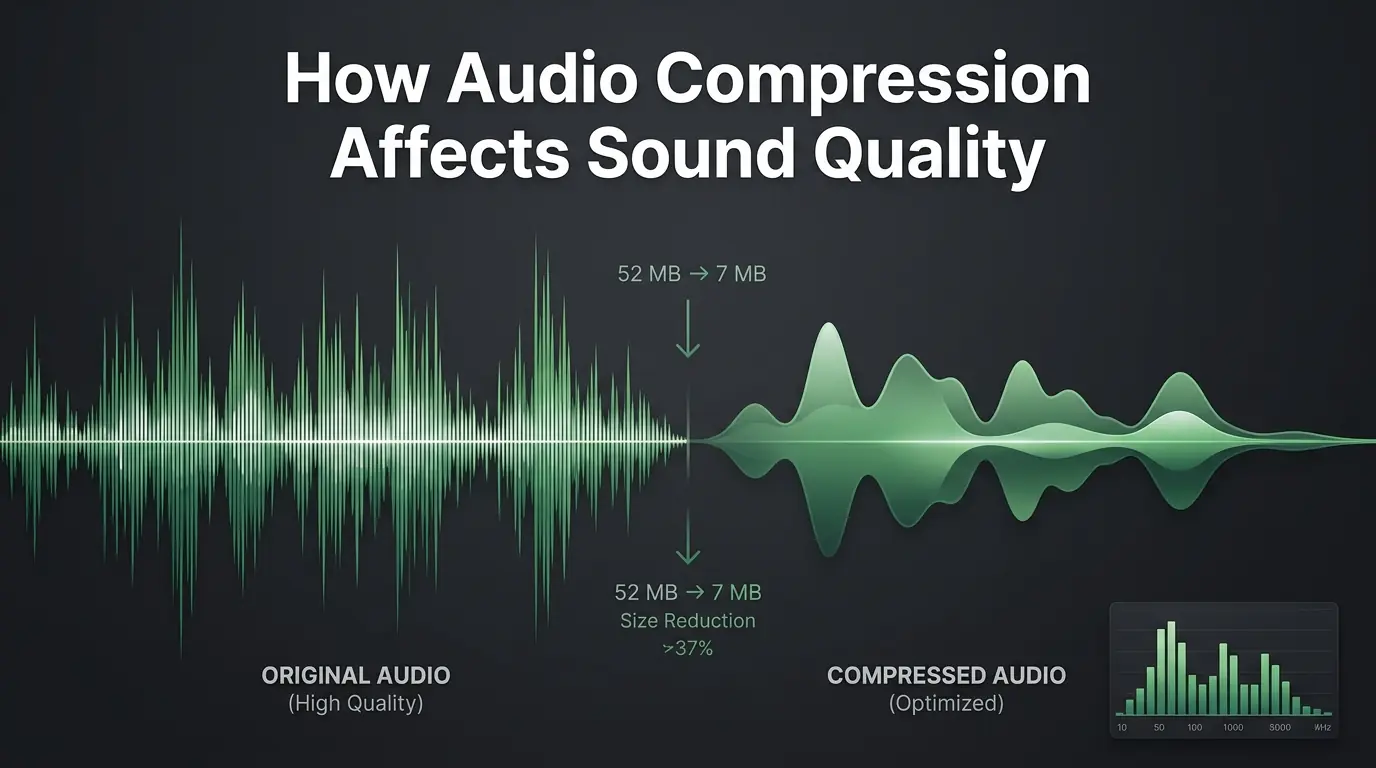
To truly understand how compression affects your sound, you need to know how the software actually works. Think of a massive, uncompressed sound track as a giant suitcase packed for a month long vacation. It holds absolutely everything inside. It contains every single breath you take. It holds the absolute lowest bass notes and the highest piercing frequencies. It even holds random background sounds that your human ears cannot naturally pick up.
All of this extra data makes the file incredibly heavy. When you run this heavy file through an MP3 Compressor, the software acts like a very smart packer. It opens the giant suitcase and starts looking for things you do not actually need to carry. It searches carefully for sounds that human ears are physically incapable of hearing.
The software uses a clever scientific concept regarding how the human brain processes noise. For example, if a very loud drum crash happens at the exact same time as a quiet whisper, your brain will only register the loud drum. The software knows this biological trick perfectly. It completely removes the digital data for the quiet whisper. You never even miss the whisper because your brain could not hear it in the first place.
By tossing out these hidden or masked sounds, the physical file becomes drastically lighter. The core sound you care about remains perfectly intact. Your natural voice stays warm. The music stays bright and clear. The heavy invisible data simply vanishes forever without bothering your audience.
Why Bloggers and Businesses Need Smaller Files
You might naturally wonder why you should even bother shrinking your media. If a file sounds perfect on your computer, why change it at all? For digital business owners, massive files cause endless daily technical headaches. Large sound tracks bring your daily productivity to a complete halt.
Imagine trying to send a quick voice note to a brand new client. You attach the file to your morning email and click send. Ten seconds later, the email bounces right back to you. The server tells you the attachment is far too heavy. Now you look completely unprofessional. You have to find a confusing third party website, upload the giant file, and send the client a strange download link. Shrinking your file beforehand solves this specific problem entirely. It allows your files to slide right into any inbox smoothly without bouncing back.
Website speed is another massive reason to control your file sizes. If you run a personal blog, you want your active visitors to have a completely smooth experience. If you place a giant audio file directly on your homepage, every single visitor has to download that heavy data. Their internet browser will freeze up. They will get annoyed and leave your website instantly. Shrinking your files keeps your website running incredibly fast and keeps your visitors very happy.
Lossy versus Lossless Formats Explained Simply
When you start managing your digital media seriously, you will hear audio experts talk about lossy and lossless formats. These terms sound highly technical, but they are actually very easy to understand. A lossless format keeps absolutely every single piece of sound data exactly as you recorded it in the studio. It never throws anything away. Because it keeps absolutely everything, the file stays extremely heavy.
A lossy format works completely differently. When you compress a file into a lossy format, you permanently throw away the unneeded hidden data. Once that hidden data is gone, you cannot ever get it back. The classic MP3 format is a famous lossy format. This definition might sound slightly scary at first. Nobody wants to permanently lose their hard work.
However, losing this invisible data is actually a wonderful thing for your daily workflow. The software only throws away the pieces your brain ignores anyway. The final result is a tiny, highly portable file that still sounds fantastic on a standard pair of headphones. You get all the massive benefits of a small file size without noticing any major drop in professional quality.
Understanding Bitrates and Audio Quality
The true secret to keeping your sound perfectly clear is carefully managing your bitrate. Bitrate simply refers to how much audio data the computer processes every single second during playback. A very high bitrate means the software uses a massive amount of data to build the sound. This gives you amazing premium quality but a much larger file size. A low bitrate uses very little data. This gives you a tiny file, but the sound might start to crackle or pop.
Finding the perfect balance is completely up to you. You get to choose exactly how much quality you want to preserve for your audience. Different media projects require very different settings. A simple spoken podcast does not need the same massive settings as a complex classical music recording.
Here is a simple breakdown of how different digital settings affect your final sound quality.
| Bitrate Setting | Overall Sound Quality | Best Daily Use Case |
|---|---|---|
| 64 kbps | Very Low | Basic voice memos and old talking audiobooks |
| 128 kbps | Good | Standard spoken podcasts and casual web sharing |
| 192 kbps | Very Good | High quality interviews and basic music tracks |
| 320 kbps | Excellent | Professional music releases and rich sound design |
As the helpful chart shows, you can easily match your settings to your specific daily needs. If you only have people speaking on your track, a medium setting works perfectly. You save tons of expensive storage space and the human voices still sound completely natural.
Warning Signs of Too Much Compression
Even the absolute best optimization software has strict limits. If you try to shrink a file entirely too aggressively, the software has to start throwing away highly important data. It stops throwing away the invisible sounds and starts deleting the sounds you actually need to hear. When this unfortunate thing happens, your recording suffers greatly.
You want to catch these major audio issues before you publish your work online. Your loyal audience deserves clear, pleasant sound. If you shrink a file too much, your listeners will definitely notice the mistake. Here are the most common signs that you squeezed your sound file entirely too hard:
- Human voices suddenly start to sound completely robotic or trapped underwater.
- Background instruments completely lose their deep natural bass sounds.
- Sharp spoken sounds like the letter S become very harsh and highly annoying.
- You hear strange, digital swirling noises hiding quietly in the background.
- The overall volume feels incredibly weak and totally flat.
If you hear any of these specific digital problems, simply go back to your safe original file. Run it through the software again, but choose a much higher quality setting this time around.
The Golden Rule of Protecting Master Files
One of the most important habits you can build as a creator is strictly protecting your original recordings. Never compress your only copy of a file. Think of your original recording as your highly valuable master blueprint. It contains all the rich, heavy data you captured naturally in the studio. You must keep this important blueprint perfectly safe.
Always store your heavy original files safely on a backup hard drive or a secure private cloud server. Then, make a separate fresh copy of that file on your computer. Use your software on the copy, not the original version. This smart habit gives you total peace of mind every single day.
If you ever make a silly mistake and ruin the sound on the copy, you do not have to panic. You can just delete the bad copy and start completely fresh from your secure master file. Building this simple protective habit ensures you never lose a great podcast episode or a beautiful musical performance to a basic technical error.
Keeping Your Mobile Listeners in Mind
When you choose your final file size, you have to think deeply about the real people who actually consume your content. Today, almost nobody sits at a large desktop computer to listen to an interview. Your modern audience listens on their personal mobile phones. They listen while jogging at the public park, driving to the busy office, or washing dirty dishes in the kitchen.
Mobile listeners face very unique daily challenges. They often deal with weak cell phone towers and very strict internet data limits. If you force a mobile listener to download an eighty megabyte voice track, their phone will definitely struggle. The track will stop playing every few seconds just to load more data. The listener will quickly lose patience and turn off your show entirely.
By using an MP3 Compressor properly, you show great respect for your busy audience. A perfectly optimized track loads instantly on any weak phone network. It plays incredibly smoothly without any annoying digital interruptions. It also saves your listeners from wasting their precious cellular data plans. A happy listener becomes a very loyal listener. Creating a perfectly smooth mobile experience is the absolute easiest way to grow your audience quickly.
Overcoming Expensive Podcast Hosting Limits
If you host a regular internet show, you already know that publishing audio online costs real money every month. Podcast hosting platforms charge you directly based on how much raw data you upload to their servers. Some platforms give you a very strict limit, like two hundred megabytes every thirty days.
If you upload massive original studio files, you will easily hit that limit after just one or two short episodes. Then the hosting platform asks you to pay extra money just to upgrade your basic plan. These tiny monthly fees add up incredibly fast over a year. It creates a massive financial burden for a small growing business or a passionate hobby blogger.
Shrinking your episodes changes this frustrating situation completely. When you bring the file weight down significantly, you can fit four or five amazing episodes into that exact same hosting limit. You completely avoid paying expensive premium upgrade fees. You keep your monthly business expenses totally manageable. You get to share much more content with your audience without spending a single extra dime.
Proper Workflows for Professional Editing
Many eager beginners make a critical mistake when editing their digital projects. They record a simple voice track and immediately compress it into a tiny format. Then they bring that compressed file into their editing software to add background music. After adding the fun music, they compress the final project a second time.
Doing this is a terrible idea for your final sound quality. Every single time you run a file through any compression software, you permanently lose a little bit of hidden data. If you do it multiple times in a row, the quality breaks apart completely. The voices become heavily garbled. The music sounds highly distorted and messy.
The correct daily workflow is actually very simple. Always do all your cutting, editing, and mixing using your heavy original files. Wait until your entire project is completely finished. Add your music, adjust your overall volumes, and fix any silly mistakes. Only use compression as the absolute final step before you publish the project online. This simple timing guarantees your final track sounds as beautiful and highly professional as possible.
How to Test Your Final Quality
After you finish shrinking a file, you should always test it thoroughly before sharing it with the outside world. Do not just look at the smaller file size on your screen and assume everything is totally perfect. You must listen to the final result closely with your own ears.
Put on a decent pair of headphones and close your eyes. Listen to the very first two minutes of your optimized track. Pay close attention to the natural sound of your voice. Does it sound human? Are the spoken words clear and easy to understand? Then, listen to a small section of the background music. Does the music sound bright and perfectly balanced?
Finally, test the track on a regular smartphone speaker. Smartphone speakers are quite small and generally weak. If your file sounds great on a cheap phone speaker, you can fully trust that it will sound amazing everywhere else. Taking two quick minutes to perform this simple test prevents highly embarrassing technical mistakes.
Why Fast Loading Speeds Matter for SEO
If you run a popular blog or a business website, search engine optimization is absolutely vital to your daily success. Google and other major search engines deeply care about how fast your web pages load for normal visitors. If your pages take a long time to appear, search engines will quickly penalize your website. They will push your hard work completely down to the bottom of the search results, making it totally impossible for new clients to find you.
When you place massive sound recordings directly on your website pages, you destroy your loading speeds entirely. The visitor's internet browser struggles greatly to pull down thirty or forty megabytes of heavy media data. The page stays completely blank, the visitor gets totally frustrated, and they immediately click the back button. Search engines notice this exact behavior instantly. They assume your website is totally broken or highly unhelpful.
By using simple optimization tools before you upload anything, you keep your web pages lightning fast. Fast pages rank much higher, bring in tons of more traffic, and ultimately grow your business entirely on autopilot.
5 Frequently Asked Questions
1. Does compressing an audio file ruin the sound quality forever?
It absolutely does not ruin your sound if you do it properly. When you use a trusted optimization tool to shrink your media, the software specifically targets hidden data that human ears cannot even process. The core sound you care about remains perfectly intact. The only way you ruin the sound is if you force the digital settings entirely too low. By choosing a balanced middle setting, your audience will never even hear a difference in the overall quality.
2. Should I delete my heavy original files after I shrink them?
You should never delete your heavy original studio files under any circumstances. Your original recording acts as your perfect master blueprint. If you ever need to edit the project again in the distant future, you must start from that perfectly clean original file. Always keep your heavy originals safely backed up on a cloud server or an external computer drive. Only upload the newly optimized lightweight copies to your website or blog.
3. What is the best bitrate for a standard podcast episode?
For a standard internet podcast that mostly features human conversation, 128 kbps is widely considered the absolute perfect setting. It keeps the final file size incredibly tiny while keeping the human voices sounding totally natural and wonderfully warm. Every single major podcast hosting platform highly recommends this specific setting to balance excellent clarity with incredibly fast mobile downloading speeds.
4. Why does my compressed file sound exactly like a robot?
If your voice suddenly sounds robotic, terribly garbled, or completely muddy, you definitely squeezed the file too hard. This specific problem happens when you choose a bitrate that is far too low, such as 64 kbps or below. At this extremely low level, the software is forced to throw away highly important parts of your voice. Simply delete that bad copy, go safely back to your original file, and try again with a much higher setting.
5. Can I run the same file through an MP3 Compressor multiple times?
You should strictly avoid doing this at all costs. Every single time you run a track through any optimization software, you permanently lose a tiny bit of actual sound data. If you shrink the same exact file three or four times in a row, the quality will break down very rapidly. The sound will become incredibly harsh and highly unpleasant. Always compress directly from your heavy master file just one single time.
Final Thoughts on Managing Digital Sound
Managing your digital media correctly does not have to be a scary or deeply frustrating process. You do not need to be a professional studio engineer to achieve truly great results. You just need to deeply understand the basic daily balance between heavy digital data and clear beautiful sound. Every single time you shrink a heavy recording, you are doing a massive favor for your loyal audience, your new clients, and your own daily workflow.
Your website pages will load much faster, keeping your readers deeply engaged with your brand. Your business email attachments will slide perfectly into client inboxes without any annoying error messages. Your loyal mobile listeners will happily save their precious cellular data while enjoying your beautiful content on the go.
Embrace the amazing power of a reliable audio tool today. Protect your heavy master files safely, choose the right settings for your specific project, and test your final copies before you publish them online. With these very simple daily habits, you will always deliver a perfectly polished, highly professional listening experience to the entire world.
Related Articles
Best Ways to Optimize Audio Files for Websites
Learn how to Mp3 optimize your sound tracks for faster website speeds. Discover simple ways to keep your audio clear and your site visitors happy.
Beginner's Guide to Audio Compression and Bitrates
Are heavy recordings slowing your site down? Learn how bitrates work and use a trusted MP3 compressor to shrink your audio files safely right now.
How to Compress Audio Files Without Losing Sound Quality
Are massive sound recordings slowing you down? Learn how to compress audio file data easily without losing quality using a trusted MP3 compressor.