Why Large PDF Files Slow Down Your Workflow and How to Fix It
Are heavy documents ruining your productivity? Discover amazing PDF compress benefits and fix slow workflows today with a reliable PDF compressor.

Picture your typical Monday morning. You sit down at your desk with a fresh cup of coffee, ready to tackle the day. You just finished creating a stunning business proposal for a major client. You open your email, write a polite message, attach your document, and hit the send button. Instead of a satisfying swoosh sound, you get a giant red error message. Your file is simply too large to send. Suddenly, your smooth morning turns into a frustrating technical nightmare.
We all face this exact problem more often than we would like to admit. Heavy digital files are the silent enemies of a productive workday. They clog up your email inbox, freeze your computer screen, and test the patience of your clients. If you want to keep your digital life running smoothly, you need to understand why these files get so massive in the first place. More importantly, you need to learn how a simple PDF Compressor can completely rescue your daily routine.
The Hidden Trap of Massive Documents
Have you ever wondered why a simple document suddenly becomes a giant digital brick? The answer usually lies in the rich media you include inside the pages. Years ago, documents were mostly just plain black text on a white background. Those files were tiny and easy to share. Today, we want our documents to look beautiful. We add colorful background designs, custom corporate fonts, and high resolution photographs.
Every time you insert a crisp photo taken from a modern smartphone, your document swallows all of that heavy data. Your computer also saves a lot of hidden information that you cannot even see. Things like author details, invisible color profiles, and the entire layout history get trapped inside the final file. You might think you are just saving a ten page report, but your computer is actually saving a massive pile of invisible junk data.
How Heavy Files Hurt Your Daily Productivity
When your files become too heavy, your entire workflow starts to drag. Think about how often you use cloud storage services like Google Drive or Dropbox. When you save a tiny file, it syncs to the cloud almost instantly. You can close your laptop and walk away in seconds.
However, when you try to save a massive fifty megabyte presentation, your computer has to work overtime. You have to sit there and watch the uploading bar crawl across the screen. If your internet connection is weak, the upload might fail entirely, forcing you to start the process all over again. This constant waiting drains your energy and completely destroys your momentum. Time spent staring at a loading screen is time you could have spent growing your business or writing your next great blog post.
Why Your Emails Keep Bouncing Back
The email attachment limit is perhaps the most common frustration for modern professionals. Most standard email providers strictly block any attachments larger than twenty megabytes. They do this to keep their own computer servers from crashing under the weight of too much data.
When you try to send a giant portfolio to a client, the email simply bounces right back to you. This forces you to find awkward workarounds. You might have to upload the file to a third party website, generate a special link, and send that link to your client instead. This extra step looks highly unprofessional. Some corporate email systems will even block links from outside websites due to strict security rules. This means your client might never even see your hard work.
The Financial Cost of Digital Clutter
Slow workflows do not just cost you time. They also cost you hard earned money. Every cloud storage account comes with a strict storage limit. When you constantly save massive, unoptimized files, you burn through your free storage space incredibly fast.
Before you know it, you receive an annoying alert asking you to upgrade your digital storage plan. You end up paying expensive monthly fees just to hold onto oversized files that you rarely ever open. If you run a small business or a personal blog, these tiny monthly fees add up to a massive yearly expense. Taking control of your file sizes is one of the easiest ways to keep your business expenses as low as possible.
PDF Compress Benefits You Cannot Ignore
Making the choice to optimize your documents brings immediate positive changes to your working life. Here are the most valuable PDF compress benefits you will experience when you start shrinking your heavy files.
- You will easily bypass strict email attachment limits and reach your clients faster.
- Your documents will open instantly on mobile phones, making your readers very happy.
- You will save massive amounts of expensive digital space on your computer hard drive.
- Your cloud folders will sync perfectly in seconds instead of taking several long minutes.
- Your website will run much faster when offering downloadable guides to your loyal visitors.
- Your professional brand will look much better when your files load without any annoying glitches.
Understanding How a PDF Compressor Works
You might be worried that shrinking your file means ruining your beautiful design. It is completely normal to feel protective of your hard work. Thankfully, modern optimization technology is incredibly smart. A good PDF Compressor acts like a highly skilled digital editor working behind the scenes.
When you upload your heavy file, the tool carefully reads the entire document. First, it looks for any high resolution images. It gently scales down the physical weight of those pictures without changing how they look to the human eye. Your beautiful photos will still look perfectly clear on a standard computer monitor or mobile phone screen.
Next, the tool hunts down all the useless invisible data we talked about earlier. It strips away the hidden formatting history and the unnecessary color profiles. It also cleans up the font data. Sometimes a document saves thousands of background font characters that you never even typed. The compressor removes all of this clutter safely. The final result is a lean, fast file that looks visually identical to your heavy original draft.
The Importance of Fast Loading for Bloggers
If you run a blog, you likely use downloadable guides to collect email addresses. Offering a free recipe book or a workout plan is a fantastic way to build a loyal audience. However, you must consider the user experience. Most of your readers are visiting your blog on their mobile phones.
If a new reader tries to download your free guide and the file is fifty megabytes, their phone browser might crash. Even if it does not crash, the download will eat up a large portion of their monthly cellular data. They will instantly regret clicking your link. By heavily optimizing your free guides before you upload them to your website, you ensure a completely smooth experience for your newest fans. Happy readers become lifelong loyal subscribers.
Comparing Document File Sizes
To give you a very clear picture of how effective this process really is, let us look at some common examples. This simple chart shows what happens when you run typical business and creative files through our reliable optimization system.
| Type of Document | Original Size | New Compressed Size | Visual Quality Loss |
|---|---|---|---|
| Simple Text Contract | 800 Kilobytes | 150 Kilobytes | None |
| Colorful Pitch Deck | 18 Megabytes | 2 Megabytes | None to human eyes |
| Photography Portfolio | 45 Megabytes | 6 Megabytes | Barely noticeable |
| Real Estate Brochure | 25 Megabytes | 3 Megabytes | None to human eyes |
As the table shows, the space savings are absolutely tremendous. You can take a giant photography portfolio and shrink it down to a size that easily fits into any standard email message.
Building a Better Daily Routine
Fixing your slow workflow requires building a new daily habit. You should never send a raw document directly to a client or upload it directly to your website. You must make optimization a mandatory final step in your creative process.
Think of it like proofreading a blog post before you hit publish. You would never publish an article without checking the spelling first. Similarly, you should never share a document without checking the file weight first. Once you build this simple routine, you will completely eliminate the stress of bounced emails and frozen computer screens.
Step by Step Guide to Fixing Your Heavy Files
We built multicompressor.com to help you speed up your workflow without any technical headaches. Our platform is completely free and requires zero advanced computer skills. Just follow this simple numbered guide to fix your massive documents today.
- Open your favorite internet browser and head straight to multicompressor.com.
- Look at the center of the home page or pdf compress page to find the large, clearly marked upload area.
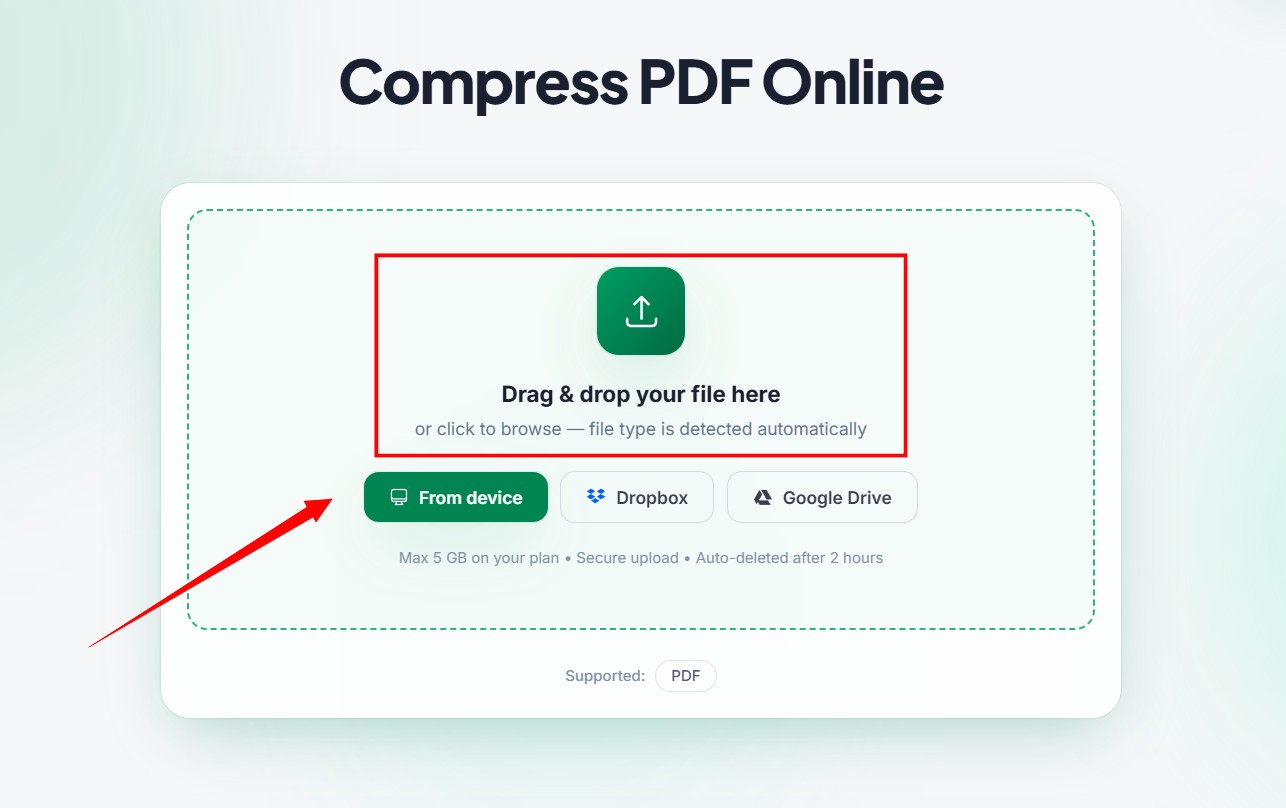
- Click the button to select a file from your computer, or simply drag your heavy document right into the upload box.
- Let the platform do the heavy lifting while our system scans and cleans your file format automatically then select output qaulity.
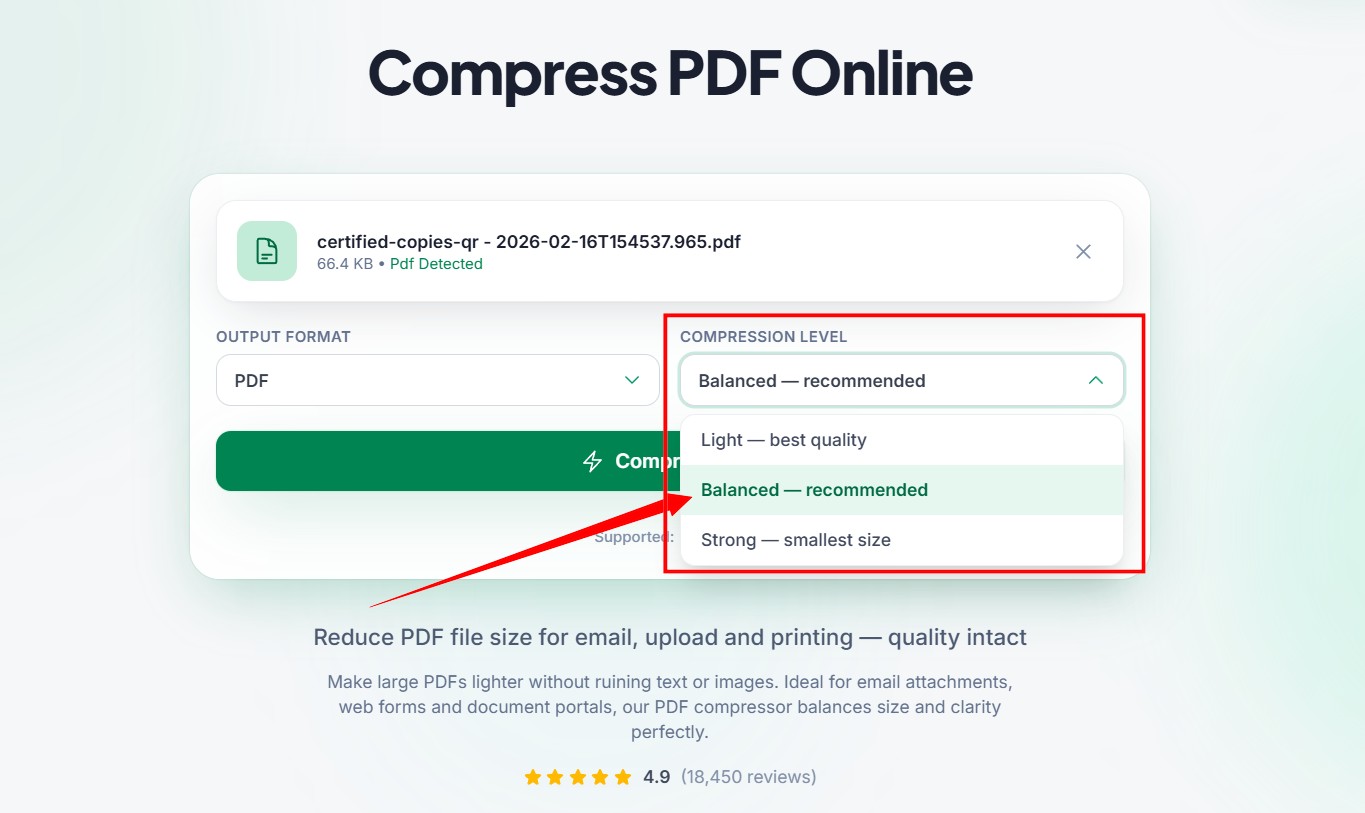
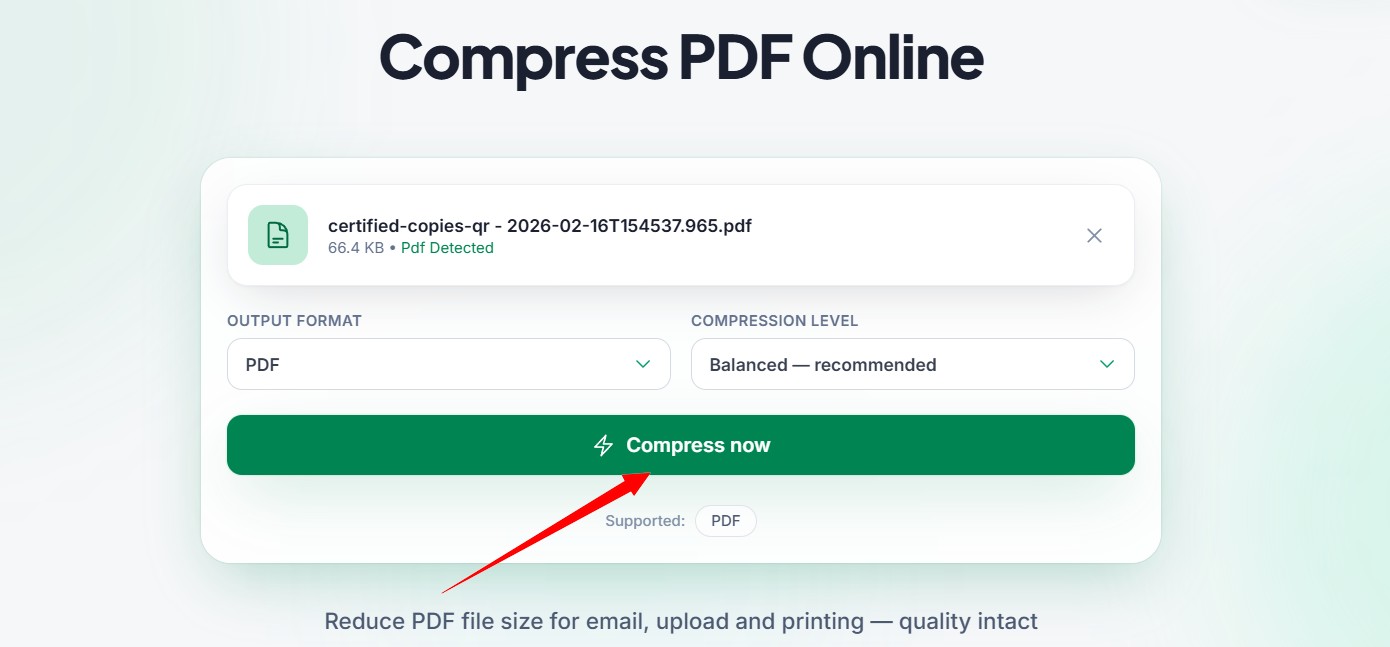
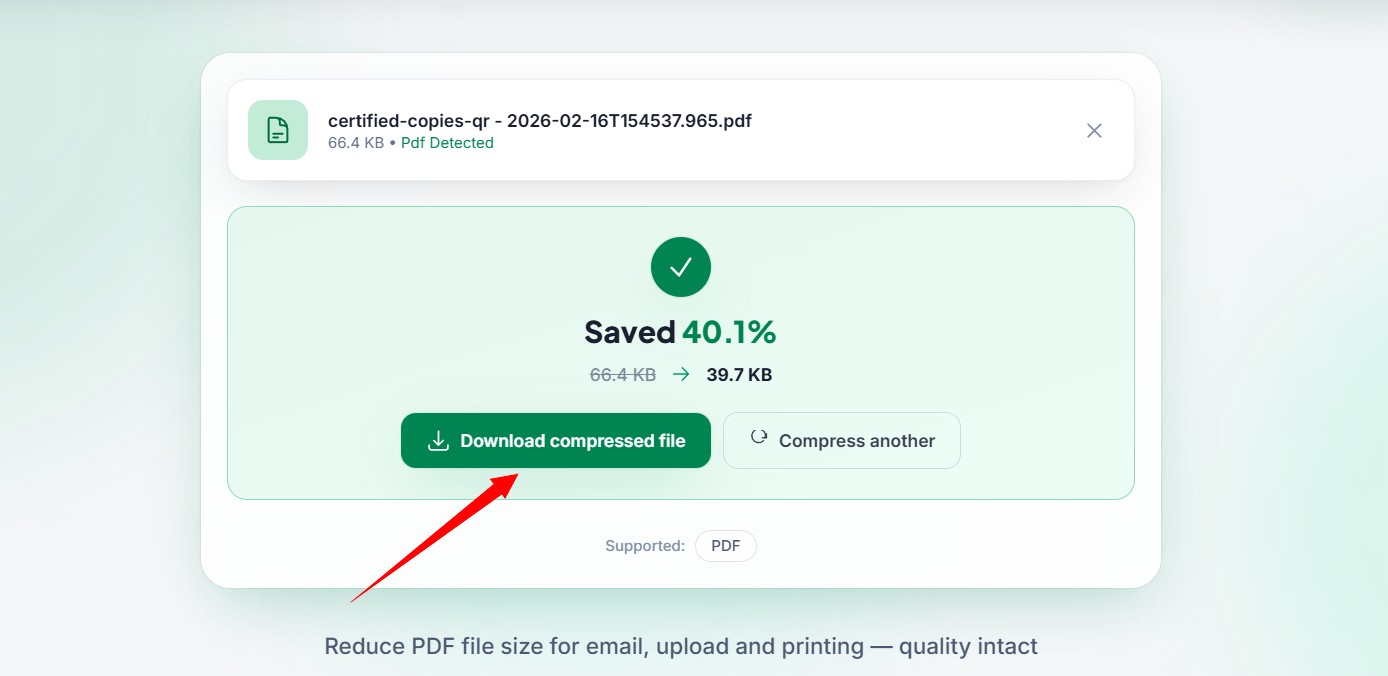
- Click to Compress button, Review the success message on the screen to see exactly how much digital weight you managed to drop.
- Click the secure download link to save the brand new optimized file back to your device.
The Perspective of Your Clients
Put yourself in the shoes of your clients for a moment. They are busy professionals with overflowing email inboxes and stressful schedules. When they hire you for a project, they expect a smooth and totally professional experience.
If you send them a massive file that takes ten minutes to download on their office network, you are wasting their valuable time. If you force them to navigate confusing third party file sharing websites just to view an invoice, you are creating unnecessary friction. Sending a neat, lightweight file shows that you deeply respect their time. It makes you look like a polished professional who pays close attention to the small details. Small gestures of convenience often lead to repeat business and glowing reviews.
Best Practices for Document Creators
While using an optimization tool is incredibly effective, you can also help yourself by creating smarter files from the very beginning. When you are writing a report or designing a brochure, try to use standard system fonts whenever possible. Standard fonts do not need to be embedded deeply into the file, which naturally keeps the weight very low.
Additionally, pay close attention to the pictures you insert. If you are adding a corporate logo to the top of your invoice, do not use a massive four thousand pixel image file. Resize the logo picture first before you ever paste it into your document. By combining smart creation habits with a powerful optimization tool, you will never struggle with heavy files ever again.
Security and Peace of Mind
It is totally normal to feel a bit anxious about uploading sensitive business documents to the internet. You might be handling private financial records, confidential legal contracts, or unreleased creative projects. You certainly do not want those files falling into the wrong hands.
We understand these valid fears completely. That is exactly why our platform operates with the highest level of strict security. Our system is fully automated. No human eyes ever look at the contents of your uploads. Furthermore, we never store your private data. A short time after you finish optimizing your file, our servers automatically and permanently delete all copies of your document. Your private business stays totally private.
Stop Letting Technology Slow You Down
We live in a fast paced digital world where speed and efficiency are required for true success. You work incredibly hard to create wonderful content, pitch brilliant ideas, and serve your clients well. You should never let a silly file size limit ruin your momentum or damage your professional reputation.
Taking control of your digital files gives you your precious time back. You will no longer waste your morning staring at a frozen upload bar. You will never have to apologize to a client for a bounced email ever again. You can focus your energy on doing the creative work you actually love doing.
5 Frequently Asked Questions
1. What happens to my private data when I use this tool?
Your privacy is our absolute highest priority. When you upload your document to our platform, it passes through a highly secure digital connection. Our automated software processes the file without any human involvement. Shortly after you download your new lightweight file, our servers completely erase your original data permanently. We never store or share your confidential information.
2. Does a PDF Compressor change my page layout?
No, the optimization process will not ruin your careful formatting. The tool only targets the invisible background code and the heavy image data. Your paragraphs will stay perfectly aligned, your fonts will remain exactly the same, and your page margins will not shift. The final optimized file will look visually identical to your original heavy draft.
3. How many files can I shrink at the same time?
You can process multiple documents easily using our batch optimization feature. If you have a folder full of heavy invoices or reports, you can select all of them and drag them into the upload box together. Our powerful servers will process the entire group quickly, which saves you a massive amount of time compared to doing them one by one.
4. Can I read the compressed file on my mobile phone?
Yes, the compressed file is the absolute perfect format for mobile reading. Because the new file is drastically smaller in kilobyte size, it will open instantly on any modern smartphone or tablet device. Your clients or blog readers will not have to waste their valuable cellular data waiting for a massive document to slowly load on their screens.
5. Is there a limit to how much a file can shrink?
The amount of space you save depends entirely on what is inside the document. If your file is mostly just typed text, it will only shrink a tiny bit because text is naturally light. However, if your document is completely packed with massive colorful photographs and complex graphics, you will see a tremendous reduction in size, often shrinking by up to eighty percent.
Take Charge of Your Digital Workspace
Dealing with massive files used to be an unavoidable headache for digital workers. Today, it is a completely solvable problem. You now understand exactly why large files slow down your computer and frustrate your clients. You also know the secret to fixing the issue permanently.
By making multicompressor.com a regular part of your working day, you ensure that every file you send is lean, fast, and professional. You unlock all the wonderful PDF compress benefits that save you time, lower your digital storage costs, and keep your loyal audience perfectly happy. Stop letting heavy documents dictate the speed of your workday. Head over to our platform right now, drop your heaviest file into the box, and watch the magic happen. You will be amazed at how much smoother your digital life can be.
Related Articles
How to Compress PDF Files Without Losing Quality
Are large documents blocking your emails? Discover why PDF compress matters and how our free PDF compressor reduces file size without losing quality.
Best PDF Size Optimization Tips for Students and Professionals
Are large documents blocking your uploads? Discover why a PDF compressor is vital and learn how to optimize your files quickly at multicompressor.com.
How to Compress Documents Without Losing Formatting
Are large document files messing up your emails? Learn how to shrink file sizes using a reliable document compressor without breaking your layout.