Best PDF Size Optimization Tips for Students and Professionals
Are large documents blocking your uploads? Discover why a PDF compressor is vital and learn how to optimize your files quickly at multicompressor.com.
We have all experienced that sudden spike of panic. It is late at night, and your final university assignment is due in exactly five minutes. Alternatively, maybe you are a business owner trying to submit a winning contract before a hard client deadline. You click the submit button with confidence, but nothing happens. Instead, a frustrating warning flashes across your computer screen. The message tells you that your document is entirely too heavy to upload.
This digital roadblock happens to students, freelancers, and business professionals every single day. We live in an era where we create beautiful documents packed with colorful images, custom fonts, and helpful digital links. While these elements make our work look great, they also create massive file sizes. These heavy files slow down your email, clog your cloud storage, and test the patience of your teachers or clients.
The great news is that you do not have to compromise your hard work or delete your favorite graphics. You can learn how to execute a proper PDF File Optimize routine to shrink those files in seconds. Let us dive straight into the best tips to keep your daily paperwork fast, professional, and completely stress free.
Why Your Documents Turn Into Digital Bricks
Before we look at the fixes, it helps to understand why your files become so bloated in the first place. When you save a project as a portable document, your computer tries to preserve every single detail perfectly. It embeds the exact fonts you selected so they look the same on any screen. It saves your strict formatting rules, your structural layouts, and your color profiles.
However, the biggest culprits behind massive files are almost always the pictures. If you copy and paste a high resolution photograph from your smartphone straight into your report, your document swallows that massive file weight whole. If you have ten pages with ten heavy photos, you end up with a digital brick that no standard portal can handle. Even invisible data, like editing histories and deep author metadata, gets trapped inside the file structure. You cannot see it, but your school or corporate server definitely feels its heavy weight.
How Heavy Files Disrupt Student Workflows
For modern students, dealing with heavy documents is a constant source of unnecessary academic stress. Most university submission platforms, like Canvas or Blackboard, have strict file size limits. They enforce these boundaries to keep their academic network from crashing when thousands of students upload essays at the exact same time.
When you try to submit a file that exceeds these limits, the system simply rejects it. If this happens right at the deadline, you risk getting penalized for a late submission. Even if you manage to upload it, a heavy file takes forever to open. Your professor might get frustrated waiting for your digital portfolio to load on their screen, which is never a great way to start the grading process. Keeping your school projects lightweight ensures your hard work gets delivered safely and on time.
The Professional Penalty of Slow Data
In the business world, heavy documents can actually cost you real money. Imagine you are pitching a new project to a busy corporate executive. You write a brilliant proposal and attach it to an email. If that file is larger than twenty megabytes, the client's corporate firewall will likely block it entirely to prevent a virus risk.
Your email bounces back, or worse, it disappears into a silent spam folder. You sit there waiting for a response that will never arrive, while your competitor swoops in with a lighter file that opens instantly. Furthermore, massive documents eat through your corporate cloud storage limits incredibly fast. You end up paying high monthly subscription fees for cloud storage just because you are saving unoptimized files. Learning how to trim that digital weight keeps your business agile and highly competitive.
The Amazing PDF Compress Benefits You Need
Taking the time to build size reduction into your daily digital habits brings immediate rewards to your professional life. Here is a close look at the most valuable PDF compress benefits you will experience when you start optimizing your files.
- You will easily pass through strict university and corporate upload portal limits without errors.
- Your documents will open instantly on mobile devices, making life much easier for busy reviewers.
- You will save massive amounts of expensive storage space on your hard drive and cloud accounts.
- Your emails will shoot across the network in the blink of an eye instead of getting stuck in your outbox.
- Your web pages will load much faster if you host downloadable guides for your blog readers.
- You will protect your professional reputation by sending smooth, glitch-free files to your clients.
Mastering the Art of File Creation
One of the smartest ways to fix heavy documents is to change how you build them from the very start. When you are putting together a presentation or an essay, pay close attention to the visual elements you select. You should never paste a raw, unedited camera photo directly into your text editor.
Instead, take a moment to shrink the physical dimensions of that picture first. If the logo on your business invoice only needs to be a tiny square on the page, do not use a massive four thousand pixel picture file. Scale the picture down to the exact size you need before you insert it. This simple habit keeps your starting file size naturally low, which makes the final optimization process even more successful.
Choosing the Right Fonts and Settings
Another hidden trap involves the fonts you use to type your assignments and reports. Some highly decorative or custom fonts require your computer to embed the entire font character family directly into the document. This background font data adds an incredible amount of weight to your file.
To prevent this issue, try to stick to universal system fonts like Arial, Calibri, or Times New Roman. These common fonts are already built into almost every computer and mobile phone on earth, so your document does not need to carry extra font packages. Additionally, when you finish your work and click the save button, look closely at the save menu. Many text editors offer a choice between print quality and web quality. Always choose the web quality option if your document is meant to be read on a screen.
Visualizing the Impact of Optimization
To help you understand how much space you can actually save, let us look at a simple comparison. This chart demonstrates how common student and professional documents transform when you apply proper optimization techniques.
| Document Type | Average Starting Size | Average Optimized Size | Quality Loss |
|---|---|---|---|
| Academic Term Paper | 4 Megabytes | 600 Kilobytes | Completely Invisible |
| Corporate Pitch Deck | 18 Megabytes | 2.5 Megabytes | None to human eyes |
| Graphic Portfolio | 45 Megabytes | 5 Megabytes | Barely noticeable |
| Monthly Business Invoice | 1.2 Megabytes | 200 Kilobytes | Completely Invisible |
As the table clearly shows, you can drop up to eighty percent of a document's weight without destroying the visible quality. Your typed text stays perfectly sharp, while the hidden clutter disappears forever.
How a PDF Compressor Works Its Magic
It can almost feel like a trick when a heavy file suddenly becomes lightweight without changing its appearance. However, the science behind a modern PDF Compressor is simply based on intelligent data filtering. Think of it as a professional digital editor cleaning up an untidy workspace.
When you upload your heavy document to our system, our smart software immediately scans the entire file structure. It searches for repetitive code strings and condenses them safely. It strips away all the hidden metadata, like your old editing history and forgotten author tags that nobody needs to see. Finally, it targets the embedded images. It gently lowers the resolution of those graphics to a standard web format. The pictures look identical on a screen, but they weigh a fraction of the original size.
A Simple Guide to Optimizing Your Files Today
We believe that technology should make your life easier, not more complicated. That is exactly why we designed multicompressor.com to be the most straightforward tool on the web. You do not need to register a personal account, and you never have to pay a single penny to use our service. Follow these simple instructions to fix your heavy documents right now.
- Open your favorite internet browser on your computer or mobile phone and head directly to multicompressor.com.
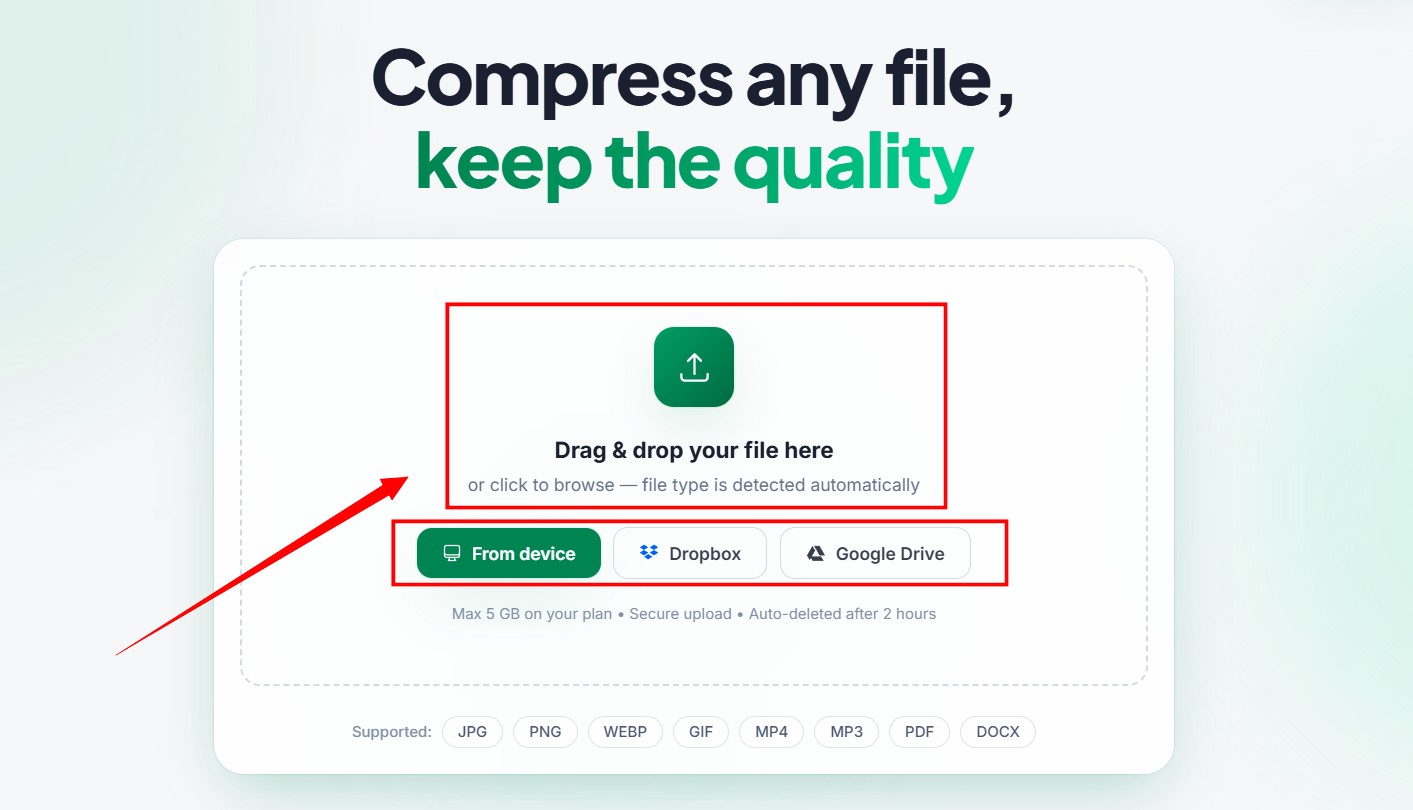
- Locate the main file manager block on our home pages or dedicated pdf compress page upload area.
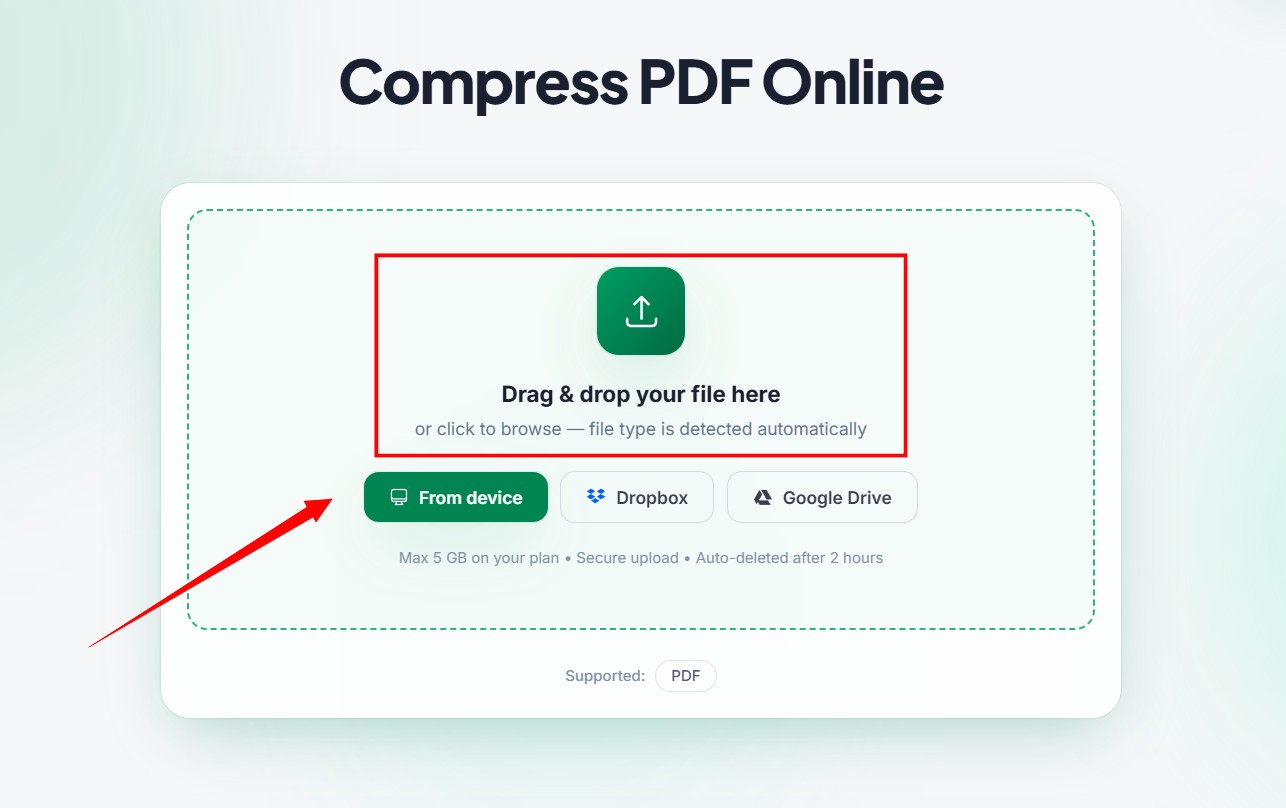
- Select your desired output quality from our clear options to control how much you want to shrink your document.
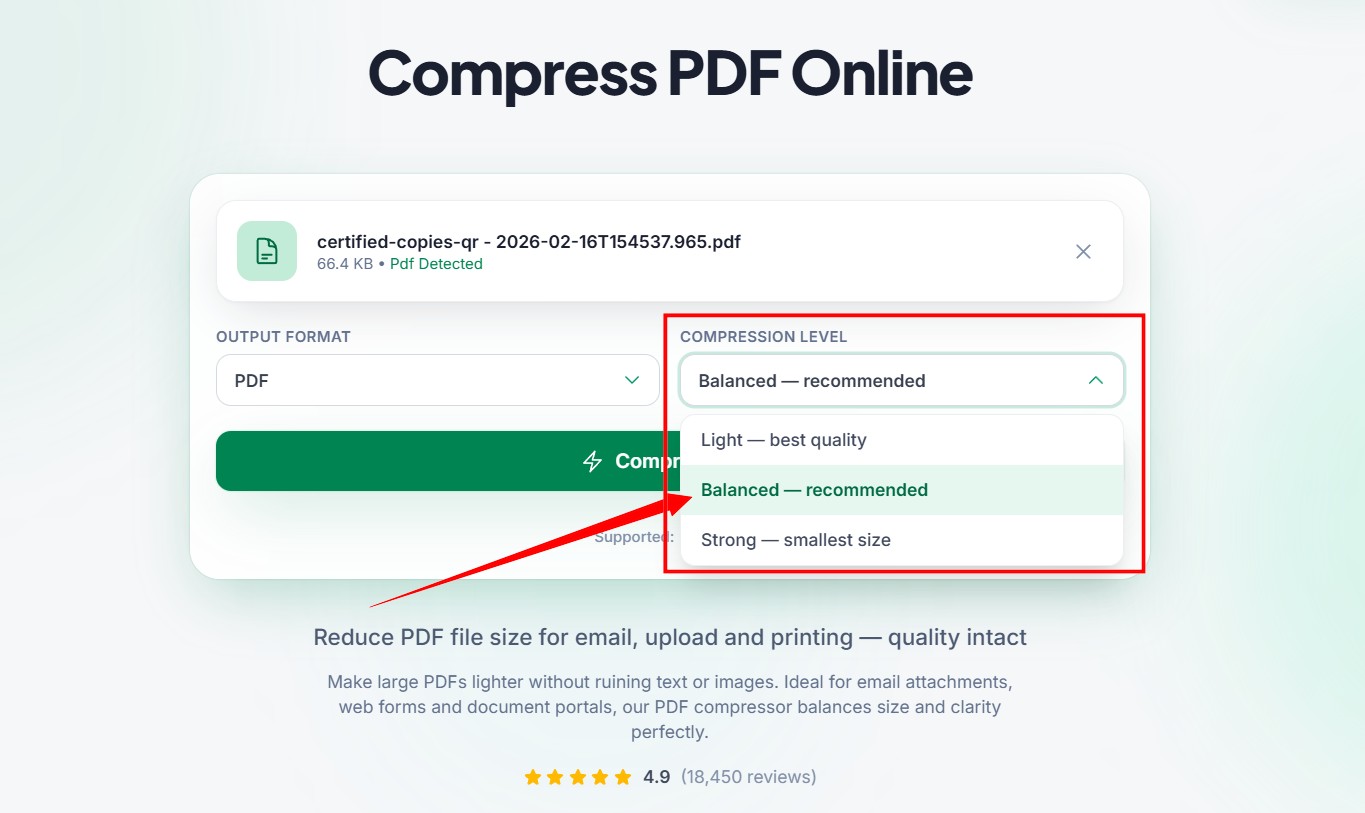
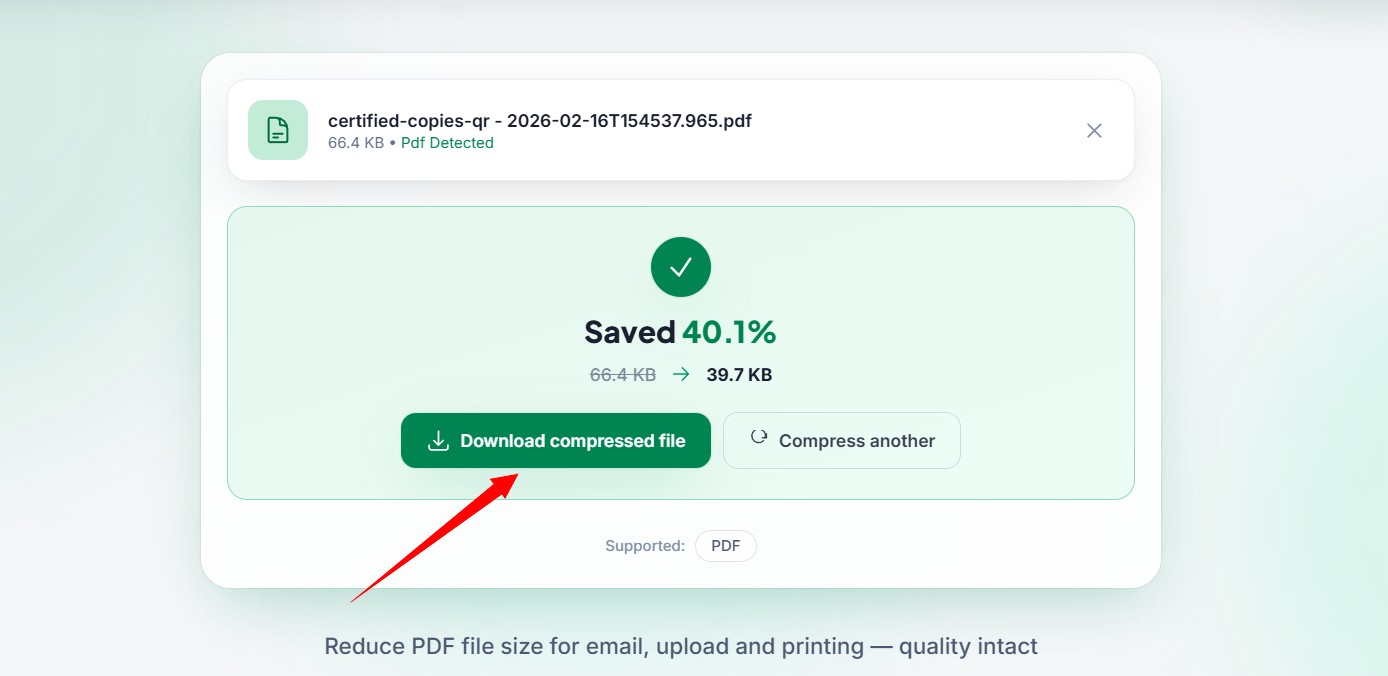
- Click to compress your document and watch our automated system clean and trim the file weight within seconds.
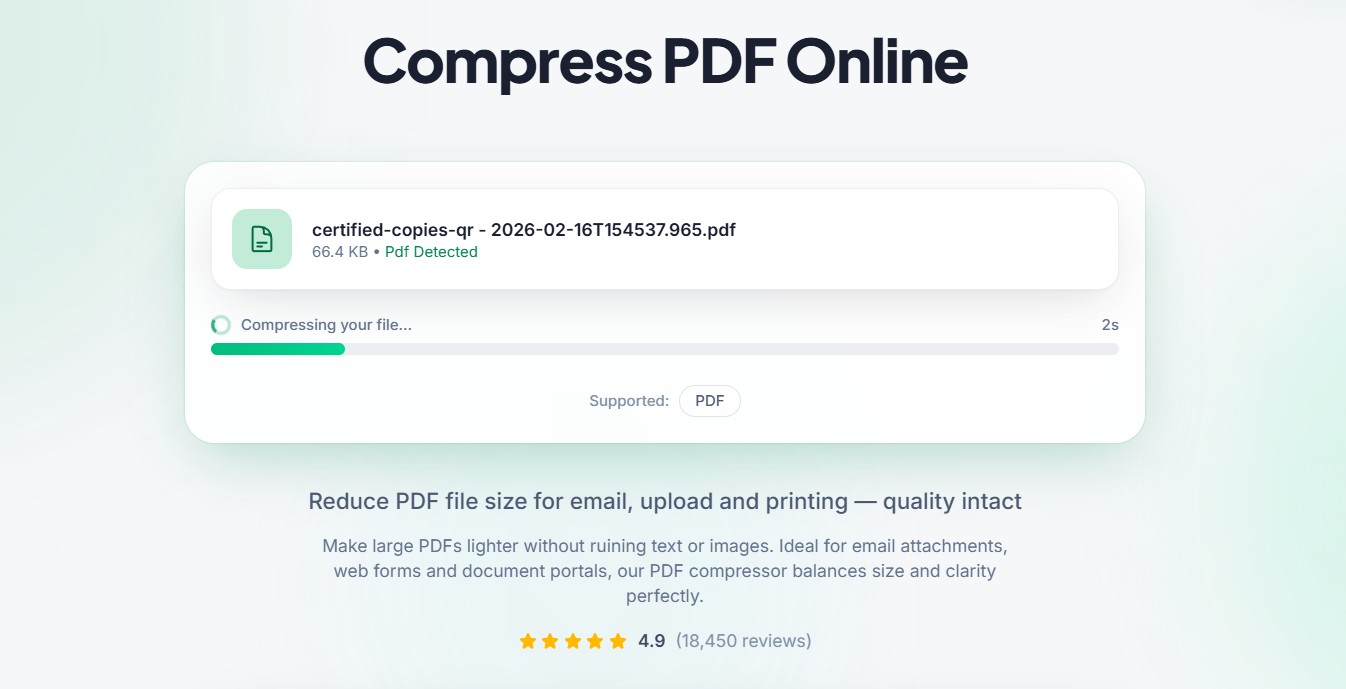
- Click the secure download link to save your brand new, perfectly lightweight document back to your personal device.
Protecting Your Sensitive Academic and Business Data
When you handle private university research, personal identity documents, or confidential corporate contracts, security is a major concern. You might feel very hesitant about uploading a private financial file to a website on the internet. We understand that fear completely, and we take your digital privacy incredibly seriously.
Our entire optimization platform is fully automated from start to finish. No human being will ever look at the contents of your assignments or business reports. Furthermore, we protect your identity by using high level secure data connections. Most importantly, we never save your files on our servers long term. A short time after you finish downloading your optimized file, our system permanently erases all copies of your document. You can optimize your most confidential paperwork with absolute peace of mind.
The Hidden Value for Mobile Readers
Think about how your teachers or business clients review their data today. They are not always sitting at a desk looking at a giant monitor. They are often reviewing essays or checking business pitches on their smartphones while traveling or relaxing at home.
If you send a mobile user an unoptimized twenty megabyte document, their phone browser might freeze or crash completely. Even if it opens, the download will consume a large portion of their monthly cellular data plan, which will instantly annoy them. When you practice proper file size control, you create a much better user experience for your audience. Your lightweight files open instantly on any mobile network, proving that you are a thoughtful and highly polished professional.
Avoiding the Trap of Repeated Optimization
While using a compression tool is incredibly effective, you must avoid a few common mistakes to protect your hard work. The biggest mistake beginners make is compressing the exact same file over and over again. They might take a file, compress it once, and then run that new version through the tool a second or third time.
This repeated process will eventually destroy your document. Every time you run a file through an optimizer, the software removes data. If you do it once, it removes the useless data. If you do it three times, it starts cutting right into the visible text and images, turning your document into a blurry mess. Always keep your original heavy draft safe on your computer, and only compress from that original file.
Streamlining Your Daily Administrative Habits
True digital productivity is all about creating smooth habits that remove friction from your working week. You should never view size reduction as a desperate emergency step that you only use when an upload fails. Instead, make it the mandatory final step of your writing process.
Just like you would never submit an essay without proofreading the spelling, you should never share a document without checking its digital weight. Once you build this quick two-second step into your regular routine, you will completely eliminate the anxiety of missed deadlines and bounced emails. You can focus your valuable mental energy on creating great content, leaving the technical worries far behind you.
5 Frequently Asked Questions
1. Will using a PDF compressor change the text in my essay?
No, the compression process will never alter or mess up your typed words. The optimization software is specifically programmed to only clean up the invisible background code and the heavy resolution of your images. Your paragraphs will stay perfectly aligned, your fonts will look exactly the same, and your page layouts will remain completely untouched.
2. Is there a limit to how many files I can optimize for free?
There are absolutely no hidden limits or daily restrictions on our website. You can use multicompressor.com to optimize as many university assignments or business documents as you need throughout the day. We want to help you keep your digital workspace running quickly and smoothly without any financial barriers.
3. Can I compress a document directly on my smartphone?
Yes, our platform is fully responsive and works beautifully on all mobile web browsers. You can easily select an assignment from your phone's file app, upload it to our site, select your options, and download the lightweight version straight back to your mobile device for immediate sharing.
4. Why did my file only shrink a tiny bit after compression?
The amount of space you save depends entirely on what elements are living inside your document. If your file is made up of nothing but plain typed text, it will only shrink a very small amount because text characters are already incredibly light. If your document contains large colorful images and heavy graphic designs, you will see a massive drop in size.
5. Are my business contracts completely safe on your website?
Your personal security is our top priority. Every single document uploaded to our platform travels through a highly encrypted connection. Our fully automated system purges your original uploads and the new compressed versions from our secure servers shortly after you finish downloading them, ensuring your private corporate data stays completely confidential.
Take Control of Your Digital Workspace
Navigating your academic career or running a successful small business is already full of daily challenges. You should never let a simple file size limitation slow down your momentum or cause you unnecessary technical stress. Managing your document sizes is one of the easiest ways to improve your daily digital efficiency.
By making multicompressor.com a regular part of your workflow, you guarantee that every piece of paperwork you send is sleek, fast, and completely professional. You unlock the full power of advanced compression technology to save your cloud storage space, protect your email delivery, and keep your reviewers perfectly happy. Do not wait for your next upload to fail. Head over to our platform right now, run your heaviest document through our simple tool, and experience the pure joy of a perfectly optimized digital life.
Related Articles

Why Large PDF Files Slow Down Your Workflow and How to Fix It
Are heavy documents ruining your productivity? Discover amazing PDF compress benefits and fix slow workflows today with a reliable PDF compressor.
How to Compress PDF Files Without Losing Quality
Are large documents blocking your emails? Discover why PDF compress matters and how our free PDF compressor reduces file size without losing quality.
How to Compress Photos Before Uploading to Social Media
Stop platforms from ruining your picture quality. Learn how to compress photos easily before uploading and keep your images looking perfectly sharp.